Imagine walking into a room and instantly knowing the exact status of a project—what’s done, what’s in progress, and what’s next. That’s the power of a well-crafted team task board, whether it’s a wall filled with sticky notes or a dynamic digital dashboard.
A physical or virtual task board is one way to display the sprint backlog. Although it’s common for scrum teams to manage their sprint backlog in digital format, it can also be done using a wall or whiteboard space, 3×5 cards, sticky notes, and tape. Digital tools that simulate a physical wall or whiteboard space and virtual sticky notes are ideal for remote teams. Figure 6-2 shows a sample task board.
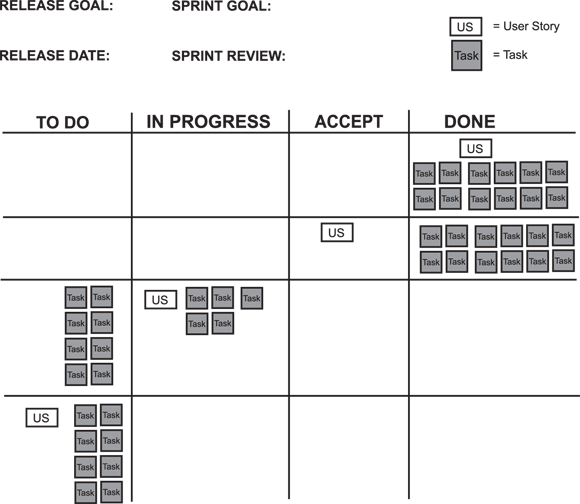
Like the product roadmap, the task board increases engagement and flexibility because it’s tangible.
A task board is excellent because it’s a quick, effective way to show the status of an entire sprint. Keeping the task board within sight of the entire product team ensures that everyone instantly knows what’s done, what’s not done, and everything in between.
The original Kanban system helped Toyota revolutionize car manufacturing, and its principles now empower Scrum teams to visualize their work and improve flow.
Use these basic elements:
-
Top
- The specific sprint goal
- The overall release goal
Release and sprint review dates can also be included.
-
Columns (from left to right)
-
To Do: Requirements and tasks in the sprint that have yet to be developed
Developers pull from the top of this list to start a new task. If two developers want to take the same task, they can pair up on it, one developer can shadow the other, or they can decide who can best handle it.
-
In-Progress: The product backlog items and tasks that the developers are working on
Different colors or stickers can be used for each task to designate ownership or identify tasks blocked by an impediment. If used, work-in-progress limits should be displayed in this column. After developers complete a task, they look here to see who they can help. Otherwise, they pull the next task from the To Do column and verify with the team that it’s the right task to work on.
-
Accept: Requirements that are awaiting acceptance by the product owner
If the requirement is rejected — and enough time is left in the sprint — it goes back to the In-Progress column. Otherwise, the requirement gets moved back to the product backlog for consideration in a future sprint.
- Done: The requirements that the product owner has accepted as complete
-
Only the developers can move the tasks from To Do to In-Progress to Done, and only the product owner can move the requirement from Accept to Done. If a requirement gets rejected by the product owner, the developers create new tasks to address why the requirement was rejected.
Want to go deeper? How Kanban inspired modern task boards
Kanban is Japanese for signboard, billboard, signal card, or card you can see. In the 1950s, Toyota formalized this concept to standardize the flow of inventory parts in its production lines. In essence, kanban boards contain cards that represent single pieces of work. Each card acts as a status signal and indicates when new work can be pulled in.
This practice helped inspire lean thinking and manufacturing practices, and many scrum teams today use something like a kanban board system. Task boards function much like kanban boards, providing a visual status (signal) of exactly where each task (piece of work) is in the overall process. This level of visibility makes it easier for developers to be disciplined and swarm on requirements to get it to the Done column.

Requirements in the Accept column shouldn’t be allowed to pile up. Ideally, when a requirement card is placed in the Accept column, it should either be placed in the Done or Rejected columns for further development the same day. If a delay occurs, the product owner needs to be coached not to let stories accumulate as they wait to be accepted. You have no reason for delay if the product owner is a dedicated team member who is available at any time for clarification, the requirements have been detailed to a single action or integration, and the requirements have passed the definition of done. It’s critical for the developers to know when their work is done and can swarm the next requirement.
How does seeing the status of all tasks at a glance help a team stay focused and accountable?
Swarming
Swarming means all developers work on only one requirement simultaneously during the sprint. Although this principle isn’t specific to scrum, it’s such an effective way for teams to execute their sprint backlog that it warrants discussion here.
One of the main benefits of scrum is that developers start and finish requirements to satisfy their definition of done to produce a potentially releasable product increment within a relatively short timebox. The team revises the process based on lessons learned and repeats that cycle again and again. The goal is to finish — not just start — as many requirements as possible.
Swarming enables teams to enjoy the following benefits:
- Maximizing chances for success, with the skills and abilities of the entire team focused on a single requirement
- Completing the cycle of planning, designing, developing, and testing to completion for each requirement
- Resolving issues and impediments today
- Dramatically decreasing the introduction of defects into a product through pairing and single-tasking (versus multitasking)
- Eliminating single points of failure in knowledge, processes, and skill sets
- Finishing the most important requirements completely and first
- Single processing of requirements is statistically proven faster than batch processing.
When team members see all their fellow developers working on a task — and there are no other tasks left for the same requirement (the user story) — it’s perfectly natural for them to think starting a new requirement is more productive than helping other developers with the in-progress requirement. However, this tendency can get out of hand to the point where teams find themselves with multiple requirements started but none of them finished. Developers can avoid this risk by shadowing, pairing, researching, or helping in whatever way necessary to get the task to the Done column.
This process ensures that something gets completely developed in every sprint and is available to show to stakeholders.
- The team task board is a central, visible tool for managing sprint progress.
- Swarming enables teams to finish tasks efficiently and collaboratively.
Take a moment to visualize your team’s process using a task board framework.
- List your team’s typical sprint tasks on sticky notes (real or digital).
- Create columns for To Do, In-Progress, Accept, and Done.
- Place each task in the appropriate column based on its current status.
- Observe: Where are most tasks accumulating? Discuss with your team what this reveals about your workflow.
What challenges might your team face in keeping the Accept column from piling up, and how could you overcome them?
Think about a time when your team struggled to finish requirements by the end of a sprint. How could using a visible task board and the practice of swarming have helped your team? Reflect on what you would do differently.
How might the concept of “swarming” challenge the way your team currently works?
Many high-performing software teams use large digital monitors to display their task boards in open office spaces, making project status visible to all—an approach equally effective for remote teams via collaboration tools like Jira or Trello.
Experienced Scrum Masters often coach product owners to review the Accept column daily, preventing bottlenecks and ensuring steady progress toward “Done.”
A visual tool (physical or digital) that displays the sprint backlog and tracks the status of requirements and tasks throughout a sprint.
When all developers focus on a single requirement at a time, collaborating to complete it before moving on to the next.
It’s better for team members to work on several requirements at once to keep everyone busy and maximize productivity.
Swarming on one requirement at a time helps teams finish work faster, resolve issues quickly, and dramatically reduce defects compared to multitasking.
What are the four main columns of a Scrum team task board?
Tap to revealTo Do, In-Progress, Accept, and Done.
Who is responsible for moving requirements from Accept to Done?
Tap to revealOnly the product owner can move requirements from Accept to Done.
What is swarming in the context of Scrum?
Tap to revealSwarming is when all developers focus on and collaborate to complete one requirement at a time.
Which column on the team task board is used for requirements awaiting acceptance by the product owner?
A team task board provides visible, real-time status of all sprint work, enabling teams to collaborate efficiently and maintain alignment throughout the sprint.
Swarming on a single requirement increases the chances of getting it to Done, reduces defects, and keeps teams focused on delivering value.
“A task board is excellent because it’s a quick, effective way to show the status of an entire sprint.”
How confident are you that you can explain the purpose and basic structure of a Scrum team task board?
The Shift
- A well-designed task board makes sprint progress visible and actionable for the entire team.
- Swarming enables teams to finish critical requirements faster and with higher quality.
- Preventing bottlenecks in the Accept column is crucial for smooth sprint delivery.