Your Sprint Backlog
How does a well-structured sprint backlog help your scrum team stay focused, adaptive, and accountable throughout the sprint?
What keeps a scrum team on track, ensuring that the work done each day truly moves the project forward? The answer lies in the sprint backlog—a living, visual plan that aligns the team’s energy with a clear goal and provides instant feedback on progress every day.
Your Sprint Backlog
The sprint backlog is created in the sprint planning session and includes the sprint goal, the ordered list of backlog items selected for the sprint, plus the plan or tasks necessary to achieve the sprint goal.
A sprint backlog might contain the following information:
- The sprint goal and dates
- A prioritized list of the requirements (for example, user stories) to be developed in the sprint
- The estimated effort (that is, story points) required to develop each requirement
- The tasks required to develop each requirement
- The hours estimated to complete each task (if needed)
- A burndown chart to show the status of the work developed in the sprint
The concept of “information radiators,” like the burndown chart, comes from agile pioneer Alistair Cockburn. These visual tools are designed to make project status clear at a glance for the entire team—and anyone passing by.
A sprint backlog is a dynamic list of product backlog items, tasks, and a plan for delivering the sprint goal, maintained and updated daily by the development team.
A visual graph tracking the amount of work remaining in a sprint versus time, helping teams quickly assess progress and spot issues early.
Want to go deeper? The science behind visual progress tracking
Research shows that visualizing work and progress (like with burndown charts) activates the brain’s reward system, offering small motivational boosts as tasks move closer to completion. This effect is known as the “progress principle” and helps teams stay engaged and productive, especially in complex projects.
The burndown chart benefit
Burndown charts are ways to represent progress achieved within the sprint visually. They depict the amount of work accomplished versus the amount left to go.
- The vertical axis represents the work left to be done.
- The horizontal axis depicts the time still available in the sprint.
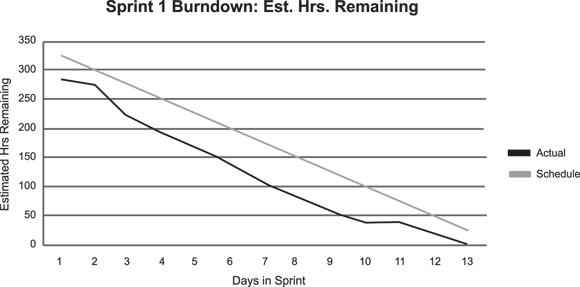
Your sprints will show a diagonal trend line from the top-left corner to the bottom-right corner, representing what an even and consistent burn would look like, though you won’t have a perfectly even burndown.
Also, some burndown charts have a line showing the outstanding story points. This allows you to quickly and easily see the status of your sprint from both time and outstanding business risk. The story-point line is a good indicator of whether a plummeting remaining capacity or time is appropriate.
If the story-point line is flat, but the team’s remaining capacity is dropping, perhaps a team member is cherry-picking tasks across multiple user stories, or developers are completing tasks, but the product owner is not giving timely approval/rejection of user stories. The lines are helpful indicators for evaluating the team’s health, product, and progress toward accomplishing their goal.

You can create your own burndown chart with Microsoft Excel or download the one included within the sprint backlog template, which you can download for free from this page: https://platinumedge.com/blog/anatomy-sprint-backlog.
The burndown chart is generated from the sprint backlog. The sprint backlog should be updated daily; only the developers can do this. At the end of each day, each developer updates their task (whether on a 3×5 card, a spreadsheet, or in an electronic tool) by entering the number of remaining hours (not the number of completed hours) left to complete the task. That’s it. One number. It takes seconds, and the results are invaluable.
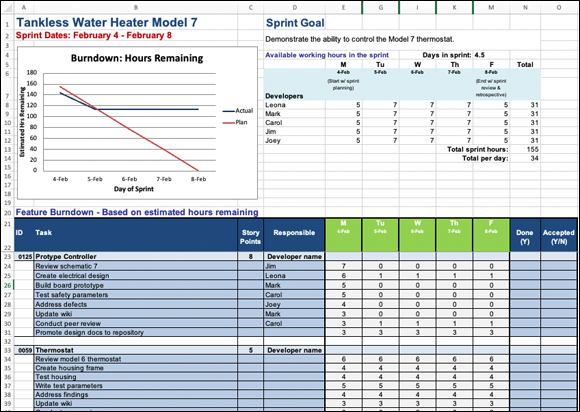
The sprint burndown chart is an information radiator that shows anyone who wants to know the status of the sprint. Burndown charts are generated automatically as developers update the amount of time left on their one active task at the end of each day.
The burndown chart shows the amount of time remaining for the sum of all the requirements on the sprint backlog. Compared with the trend line, it provides a daily level of status detail for a scrum team that you can’t get with traditional project management techniques.
How might a burndown chart help your team identify issues before they become roadblocks?
Many agile teams display their burndown charts in a central area or on a shared dashboard, so even stakeholders outside the scrum team can instantly check sprint status without interrupting developers.
Setting backlog capacity
How much capacity is in a day? If you’re looking at the number of hours a developer can devote per day to their main job — developing! — allow for less than eight hours. Every organization has a certain amount of overhead. We find that for most organizations, somewhere between five and seven hours is a normal effective workday.

An average of 16 hours per week are wasted on unclear objectives, poor team communication, and ineffective meetings.
How much capacity is really in a sprint? In a one-week sprint, scrum teams will spend up to two hours in sprint planning, up to one hour in sprint review, and up to 45 minutes in a sprint retrospective. That’s about four hours in sprint meetings. (Do you have to use all four hours? No. Can you go over the limit for any given meeting? No.)
That accounts for four of the five scrum events (assume that a maximum 15-minute daily scrum won’t affect development time), but don’t forget product backlog refinement. We find that developers will, on average, spend 10 percent of their time each sprint in product backlog refinement activities. This translates to about three to four hours in a one-week sprint.
Often, we find that teams don’t need the full recommended timebox for shorter sprints, but for longer sprints (such as three or four weeks), we find they often will max out the timebox and very likely need even more. As with all things agile, barely sufficient applies even to team meetings.
Is there any buffer in scrum? Sure. We call it slack. Consider that the developers have 165 hours available to them for a sprint. They shouldn’t take on 164 hours under the false assumption that everything will go exactly according to plan. The slack varies from team to team, but you should make it transparent.
So, the capacity for one developer for a one-week sprint would be 18 to 27 hours, depending on the organization’s established effective workday. Take this into consideration when identifying the developers’ capacity during sprint planning. This is assuming no paid holidays, vacations, or other time off is planned that will keep developers from developing.
Who said scrum is the Wild West? You can’t get much more disciplined than this.
What an incredible impact having a dedicated and effective scrum master means to a scrum team’s capacity. By removing the organizational drag (impediments) that keep effective workdays from increasing from five to seven hours, the impact can add up to an addi…
What factors might reduce your team’s effective daily capacity, and how could you account for them during sprint planning?
Test drive the core visual tool of scrum:
- List five tasks you need to complete this week (use real or hypothetical work).
- Estimate the hours needed for each task.
- Draw a simple burndown chart with “hours remaining” on the y-axis and “days” on the x-axis.
- Each day, update your chart—did your “burn” match your actual progress?
How would daily updates to the sprint backlog and burndown chart change a team’s ability to self-organize and adapt?
Teams should aim to fill their sprint backlog to match every available hour, leaving no buffer.
Scrum encourages teams to leave slack in their capacity to handle unexpected work and ensure sustainable pace—overcommitting leads to missed goals and burnout.
“The sprint backlog should be updated daily; only the developers can do this. At the end of each day, each developer updates their task … by entering the number of remaining hours … left to complete the task. That’s it. One number. It takes seconds, and the results are invaluable.”
- You understand the essential elements of a sprint backlog.
- You can describe how burndown charts provide real-time feedback on progress.
Practitioners recommend holding a brief daily “backlog update” ritual right after the daily scrum, ensuring the burndown chart reflects reality and triggers timely discussions about blockers.
What is a sprint backlog?
Tap to revealA prioritized list of sprint items and their tasks, plus the plan to achieve the sprint goal, created and maintained by the developers.
What does a burndown chart track?
Tap to revealThe amount of work remaining versus time left in the sprint.
Who is responsible for updating the sprint backlog daily?
Tap to revealOnly the developers—not the scrum master or product owner.
Describe a time when a lack of visual progress tracking (like a burndown chart) hurt a project’s success—or imagine how adopting one might have changed the outcome. What lessons can you take forward?
Who is responsible for updating the sprint backlog and entering the remaining hours for each task at the end of each day?
A well-maintained sprint backlog and daily-updated burndown chart empower scrum teams to self-organize, spot problems early, and consistently deliver value.
Accurately setting sprint capacity—including slack—prevents overcommitment and supports sustainable, predictable delivery.
The Shift
- The sprint backlog is a living tool for planning, tracking, and adapting work during the sprint.
- Burndown charts provide immediate visual feedback, helping teams adjust and maintain momentum.
- Realistic capacity planning (with built-in slack) is crucial for sustainable, reliable scrum delivery.